Nokia | Feb–Apr 2026
Turning cyberattack investigations
into a single conversation.
INTRO
In the world of high-speed networking, a 5-minute delay in identifying a traffic anomaly can cost a Tier-1 provider (like AT&T or Rogers) hundreds of thousands of dollars in SLA penalties. Nokia Deepfield is a network defense system that stops these cyberattacks and delays in real time.
Over 12 weeks, this project gave me the opportunity to contribute to a SaaS solution that keeps the internet online for millions of people.
ROLE
Product Designer
TEAM
Design Manager
Product Manager
3 Software Engineers
TYPE
Enterprise SaaS
AI Design
Design System
TOOLS

A chat feature connecting AI summaries with raw data logs.
Embedded interactive widgets to enable user action.
Scaled a conversational component library across the broader design system.
Consolidated 5+ dashboards into one conversational AI interface.
Delivered a validated blueprint for the upcoming engineering build.
Shipped 10+ high-density components to the Deepfield Component Library.
Process
SETTING THE SCENE
If the internet was a massive highway, Nokia Deepfield is the high-tech traffic control center that detects car accidents (cyberattacks) in real-time.
Deepfield was already five years old when I joined, and its human element was missing. The product's core analytics engine was incredibly powerful, but extracting insights from massive amounts of data was a core user problem.
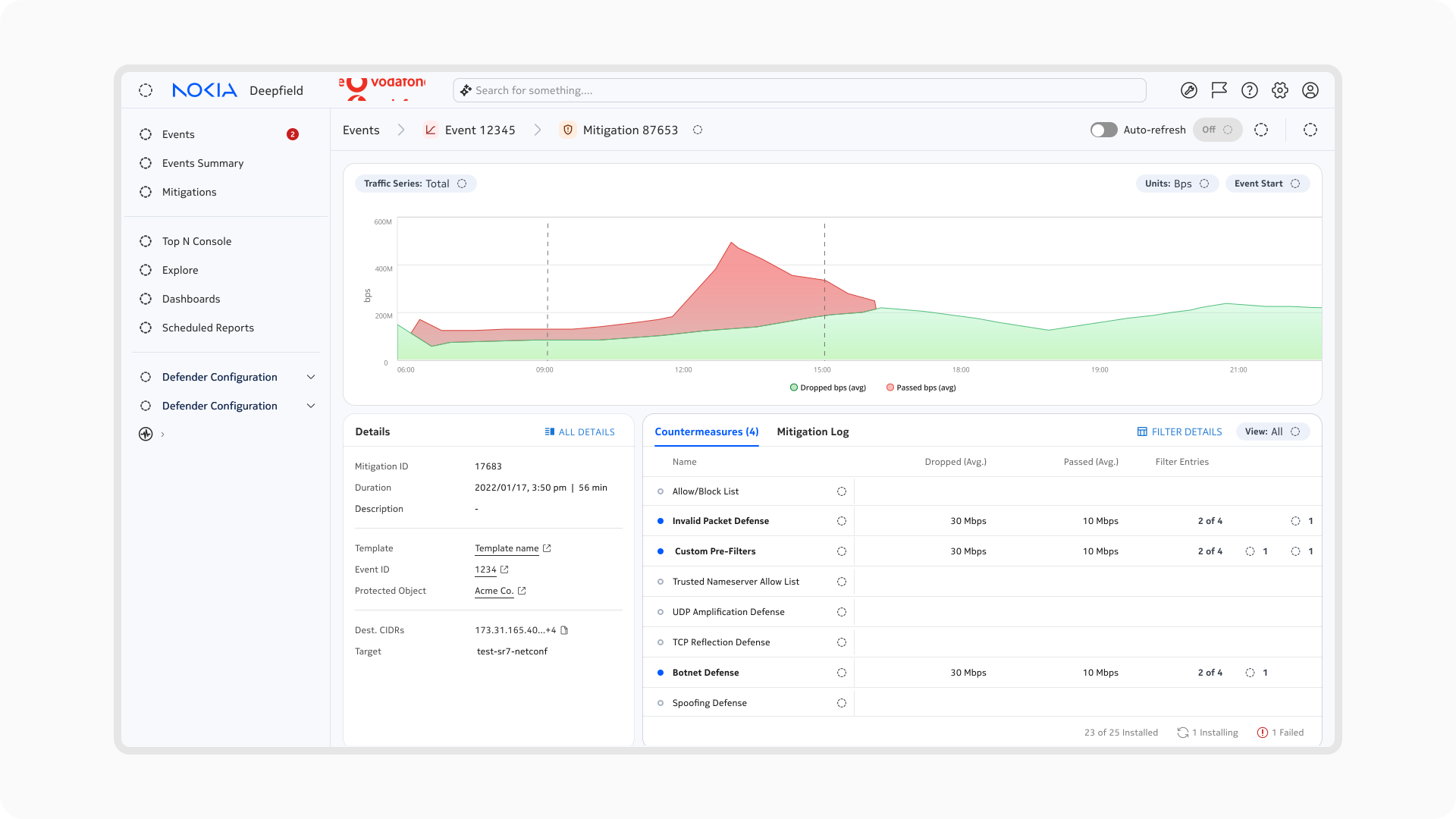
To understand why the data was so overwhelming, this is the client UI of a singular attack (bundled with hundreds).
UNDERSTANDING USERS
Deepfield is built for network operators at Tier-1 providers. These are deeply technical users who rely on granular data to perform IT and security services.
When I was onboarded, the overarching product demand and feature scope for Ask Deepfield were already finalized as capabilities were locked.
So I pivoted away from feature ideation and focused entirely on the visual hierarchy and conversational design. I discovered three core needs from user interviews.
IT specialists need speed under pressure.
Every minute of an attack risks costly SLA penalties.
Cross-referencing 5+ dashboards manually takes too long.
The UI must provide instant, actionable summaries.
Users need to trust the AI.
Power users need progressive disclosure.
No legacy data can be removed; every metric matters.
The UI must start with a digestible, high-level overview.
Engineers need a seamless way to drill down into the granular logs.
FULL WORKFLOW
Before touching design, I needed to know if Ask Deepfield’s logic actually made sense to the people who’d be using it. Once that logic held up, I moved into Figma. Using Figma’s MCP, I could hand that context straight to LLMs and prototype against real constraints.
My role here was mostly translation:
Turning research into concrete interaction states.
Catching edge cases before they became engineering problems.
Building live prototypes in code for user testing.

Iterations
CONSTRAINT #1
Ask Deepfield cannot execute high-stakes commands autonomously. When the AI needs explicit user permission, open-ended text chat creates too much risk and cognitive load.
I added new AI components to our design system to fix long-standing UX issues, with documented guidelines to have a progressive conversational UI (example below).
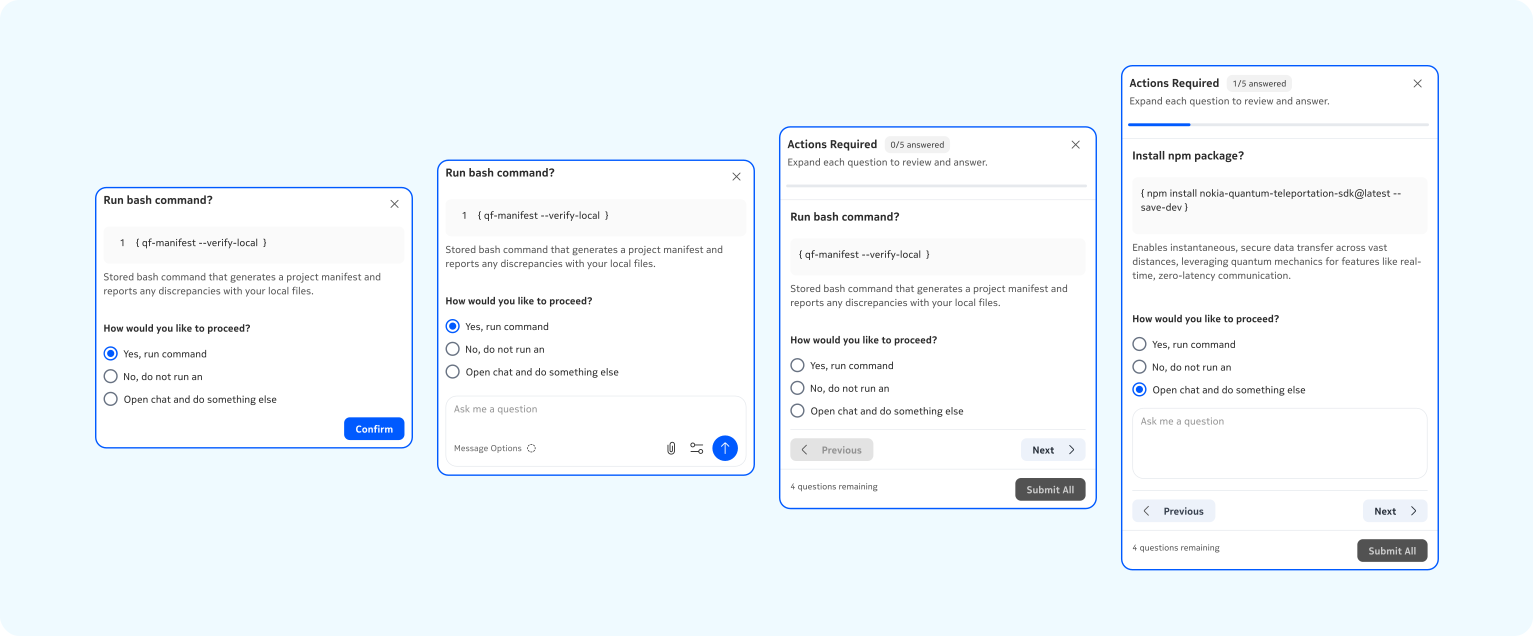
Dashlets with radio-button choices for standard approvals and nested text inputs for follow-ups.
CONSTRAINT #2
AI responses on complex queries can take a while, and there was no agreed pattern for what users should see while they wait — which caused inconsistency and repeated debate. Once we had a solid base of components, I focused on patterns.
I audited other design systems and products (via Mobbin) to define clear guidelines for recurring problems and established a design pattern in the AI outputs where it progressively communicates its reasoning and data sources in real time.
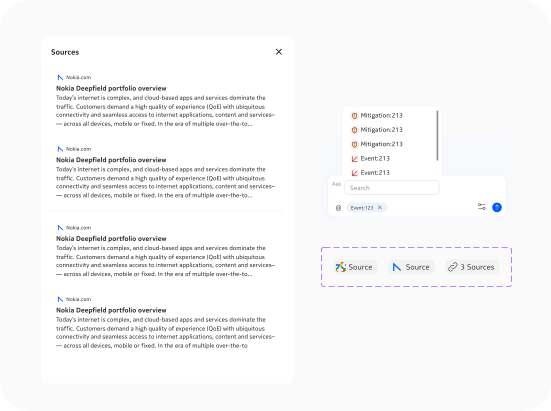

In my early stages of prototyping, I experimented with ways to engage users while consolidating information.
Solution
TARGET USE CASES
Network attacks aren’t uniform, so our user’s experience wouldn’t be either. I looked at how engineers make decisions under pressure as there’s a difference between verifying a conclusion and triaging between parallel options.
Single reports are meant for verification, it provides a direct summary with collapsible key findings so engineers can validate the AI’s logic and act immediately.
Multi reports isolate concurrent entities into separate modules so engineers can scan top-level data and drill into the specific problem network.
Single Reports vs. Multi Reports
EDGE CASE #1
Standard AI assistant UI is subject to a small portion of the platform's screen but our users can't afford to lose sight of the raw data.
To support these new workflows, I introduced a split-view layout where the conversation and data panels are independent but connected.
High-level summaries can be read while actively digging into network logs right next to it. Users can verify data without losing chat access.
EDGE CASE #2
Instead of forcing IT security professionals to switch between multiple dashboards, I brought controls directly into the chat.
I designed flows where the AI surfaces interactive widgets (components from design pattern library) to propose a fix. In this scenario where decision fatigue can cause financial loss, eliminating jarring context switches is a high priority.
Design System
SHARED COMPONENT LIBRARY
My component work extended far beyond Ask Deepfield, with new interactive patterns (including Dark Mode) added to the broader Network Infrastructure (NI) design system.
I worked with our Design Systems Manager to establish a single source of truth and scaled these components across four different enterprise products including Deepfield.


Results
RESULTS
As the first UX intern on Deepfield, working on a massive enterprise project, my ultimate goal wasn’t to ship the final product, it was to de-risk it.
My core objective was to validate the research and UX logic through user testing before engineering committed months to building it later in the year.
Our team campaigned for Ask Deepfield with results from testing and secured buy-in needed to officially commit engineering resources (super proud of this team!). I left the team with a fully validated prototype and a user-backed blueprint to develop from.


LEARNINGS
What looked like a visual clutter problem was actually a pacing problem. For Ask Deepfield, every single metric on the screen was necessary. I learned to give users digestible decisions first and let them drill into complex interactions only when needed.
A seamless experience is actually dangerous when a false positive can cost hundreds of thousands of dollars. Having users to pause and verify the system's logic before executing a command isn't bad UX; it’s how you build genuine trust.
This was my first time working in Cursor and it quickly became one of my most useful tools for exploring ideas. I learned that high fidelity can make a weak concept feel more resolved than it actually is. It was a great lesson in knowing when to push a prototype further and when to rethink the core idea in the canvas.


